



.webp?width=350&height=85&name=Amazon%20(1).webp)
.webp?width=300&height=72&name=Apple%20(1).webp)
A user calls because payroll access is locked, then hears the ticket has been escalated. That word feels vague when no one explains where the request went, who owns the next step, or when work will resume.
IT support tiers match the issue with the right skill level without making users repeat the same story. The right structure reduces stalled tickets, downtime, repeat explanations, and uncertainty.
Anthony Mongeluzo, Founder/CEO at PCS, notes: "Escalation should never feel like a handoff into the unknown. Users need clear ownership, accurate notes, and the right technician engaged quickly."
What The Tiers Of IT Support Really Mean
Support tiers are levels of technical skill and responsibility used to route issues to the right person. As TechTarget's help desk overview notes, tickets should only escalate after first-contact staff have exhausted their own resources. The purpose is not bureaucracy. The purpose is faster resolution, better use of specialist time, and fewer tickets sitting idle while users wait.
The structure behind the helpdesk affects approvals, invoices, users, devices, and daily work.
- Speed at intake: Common issues, such as password resets or access problems, should be handled before they interrupt a full workday.
- Right technical depth: Complex problems need people who understand systems, permissions, applications, and infrastructure.
- Clear escalation ownership: When a ticket moves, notes, screenshots, error messages, and user impact should move with it.
- Useful ticket history: Good documentation prevents the same user from explaining the issue again.
- Continuity during disruption: The tiers of IT support help keep phones, cloud apps, shared drives, and endpoint access moving.
A payroll application login problem on processing day is not just a password issue if several users are affected. A human-first support model keeps users informed while the right technician checks access rules, application status, and vendor involvement.
The next step is understanding what each level owns. Passwords, workstations, networks, security investigations, and vendor coordination all require different responsibilities.
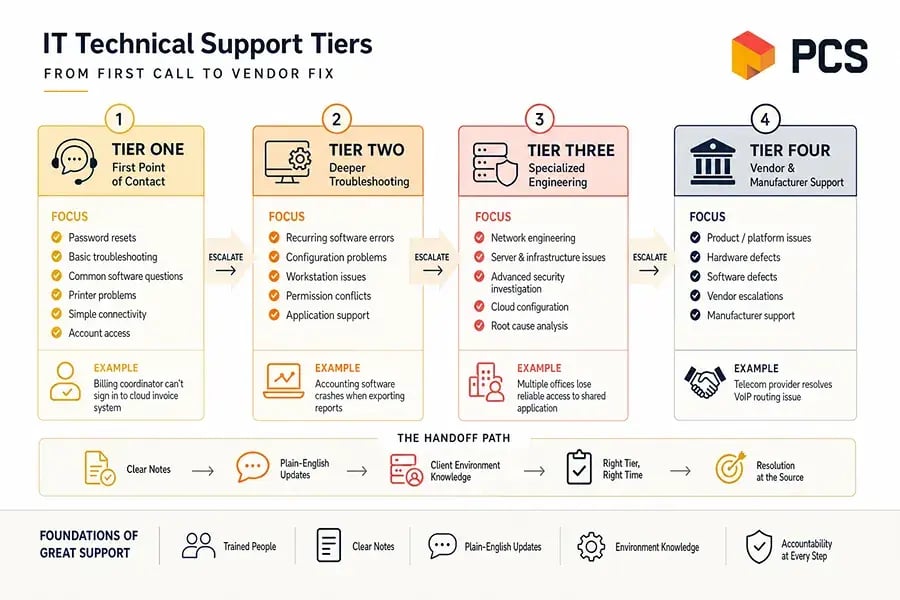
IT Technical Support Tiers From First Call To Vendor Fix
Each tier has a role, but the handoff between tiers determines whether support feels smooth or frustrating. IT technical support tiers work best when trained people use clear notes, plain-English updates, and knowledge of the client's environment.
Tier 1 First Point Of Contact
Tier 1 is the first support layer. It handles password resets, basic troubleshooting, common software questions, printer problems, simple connectivity issues, and account access.
If a billing coordinator cannot sign in to a cloud invoice system, a fast first response gets that user working again without waiting for an engineer.
Tier 2 Deeper Troubleshooting
Tier 2 handles issues that need more technical depth than first-contact support. This includes recurring software errors, configuration problems, workstation issues, permission conflicts, and more involved application support.
For example, if accounting software crashes every time a report exports, Tier 2 reviews the workstation, permissions, updates, and application behavior so the same ticket does not reopen every week.
Tier 3 Specialized Engineering
Tier 3 brings advanced expertise to network engineering, server issues, infrastructure problems, security investigation, cloud configuration, and root cause analysis.
If multiple offices lose reliable access to a shared application, Tier 3 checks routing, firewall rules, server health, and cloud configuration. The business value is resolution at the source instead of repeated patches.
Get IT Escalations Moving
If stalled tickets and unclear handoffs slow your team down, PCS can help structure support around faster resolution.
Tier 4 Vendor And Manufacturer Support
Tier 4 involves a vendor or manufacturer when the issue sits inside a product, platform, hardware device, or software system.
If a telecom provider must correct a VoIP routing issue, PCS coordinates the technical conversation so the client does not have to manage logs, screenshots, ticket references, and follow-up alone. That reduces delays and keeps accountability visible.
What Is The Difference Between Different IT Support Tiers For Daily Operations?
A recurring network slowdown can start with one complaint, then affect invoice processing, cloud application access, and VoIP calls across multiple offices. Escalation helps when the first technician captures the right details and routes the ticket cleanly. It slows work down when users have to restart the story at every step.
That is the practical answer to what is the difference between different IT support tiers: each level should remove friction from a specific type of work interruption.
- Faster first contact resolution
Common issues should be resolved immediately when they do not require a specialist. First call resolution is a widely tracked service metric for exactly this reason. A locked account before an approval deadline should not wait behind an infrastructure project. - Cleaner escalation paths
Good notes prevent users from repeating device names, error messages, file locations, and timing. The next technician should already understand what happened and what was tried. - Better specialist focus
Engineers should spend time on complex work, such as firewall changes or server performance, not routine resets. That protects project timelines and urgent response capacity. - Lower workflow interruption
Support routing matters when payroll, billing, scheduling, client service, and manager approvals depend on the same systems. Clear ownership keeps work moving. - Stronger accountability with vendors
When software, hardware, or telecom providers are involved, someone must manage the technical back and forth so internal staff can stay focused on the business.
IT Support Tiers Explained Through The PCS Model
A tiered model only works when people, process, documentation, and communication work together. At PCS, we keep IT support tiers explained in plain English because clear support paths affect tickets, users, uptime, and accountability.
Our LiveLine Promise means calls are answered by a real PCS professional within 30 seconds, 24/7/365. From there, we focus on first-call resolution when the issue can be solved immediately, such as a password reset, software access issue, or printer problem before a meeting. Industry research from HDI shows first contact resolution is the single strongest driver of customer satisfaction in support desks.
When escalation is needed, we route the request to the right expertise level and keep ownership clear. Support is delivered by trained PCS personnel, not outsourced call takers who do not know the environment.
Our dedicated CSUs know each client's systems, history, users, vendors, and recurring pain points, which reduces repeat explanations and improves context. PCS University supports that consistency through ongoing internal skill development.
Changing support expectations across an organization takes coordination, especially when users are used to chasing updates themselves.
- Review recurring tickets: Look for repeated access issues, workstation errors, printer failures, or application slowdowns.
- Check escalation notes: Ask whether screenshots, logs, affected users, and business impact travel with the ticket.
- Confirm vendor ownership: Decide who manages software, telecom, hardware, and cloud provider communication.
- Verify support delivery: Know whether your provider uses trained internal staff or outside call queues.
- Set urgent expectations: Define what happens when phones, payroll, billing, or security alerts need immediate action.
|
Operational Scenario |
Evidence to Capture Before Escalation |
Likely Owner or Handoff |
Service Quality Indicator |
|
Remote employee cannot access Microsoft 365 after password reset |
Azure AD sign-in logs, MFA status, device name, recent password-change timestamp |
Helpdesk verifies identity, then routes to Level 2 if conditional access blocks login |
User regains access without a duplicate ticket |
|
Accounting workstation loses connection to QuickBooks shared file |
Workstation hostname, mapped drive path, server logs, SMB status |
Level 2 coordinates with server engineer if permissions or service errors appear |
Finance reopens the file before payroll or billing is affected |
|
Branch office reports intermittent VoIP call drops |
Firewall logs, ISP circuit status, packet loss test, extensions, call timestamps |
Network specialist works with the telecom vendor and documents carrier updates |
Call stability is confirmed during peak volume |
|
New hire needs laptop, email, security groups, and application access by start date |
HR onboarding form, approved role template, device assignment, required SaaS apps |
Dedicated service unit coordinates endpoint setup, identity provisioning, and approval |
Employee signs in on day one with required access |
|
Endpoint security alert flags suspicious PowerShell activity |
EDR alert details, process tree, user account, isolation status, recent downloads |
Security engineer investigates, then escalates if containment requires broader changes |
Threat is contained, root cause is documented, and prevention steps are added |
Choosing Support That Keeps Work Moving
Understanding support tiers helps you evaluate whether an IT provider is built for resolution, not just ticket routing. Good support reduces stalled tickets, repeated explanations, vendor confusion, and avoidable downtime across the systems people use every day.
If your users are waiting too long, retelling the same issue, or chasing vendors on their own, we can help you review the workflow behind the tickets.Contact PCS to schedule a discovery call or request a Free Network Assessment, and we can walk through how our tiered support model applies to your environment.
|
IT Support Services Near You |