



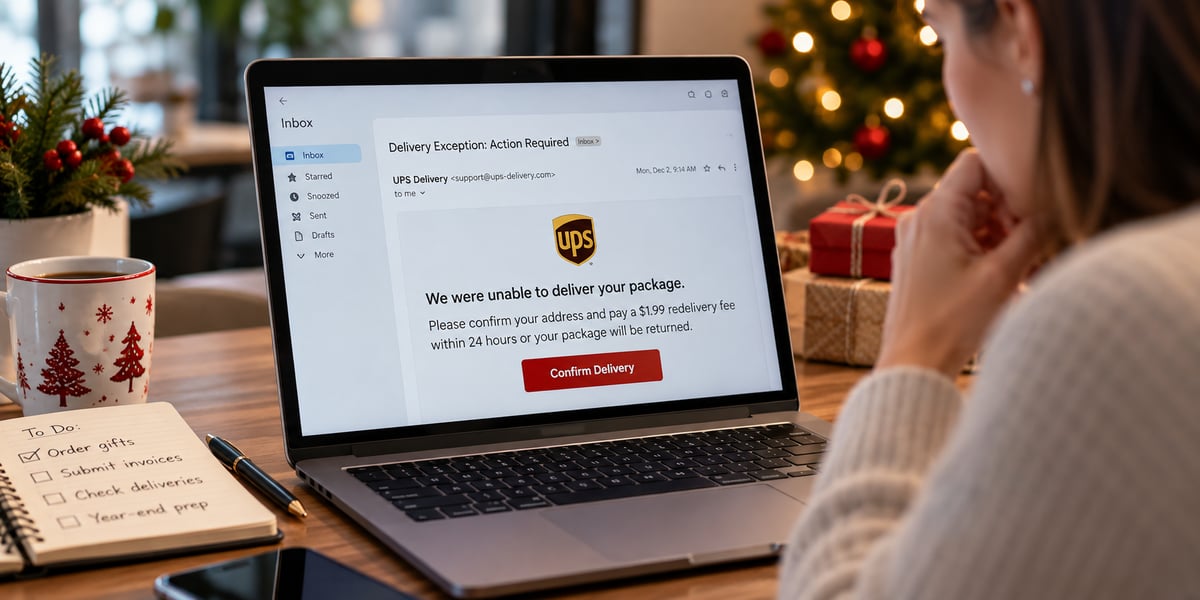
By December, an email about a delayed package can feel like just another thing to deal with. You’re waiting on orders, finishing work before time off, and covering for someone who’s already out.
A fake delivery notice doesn’t necessarily stand out. It feels like Tuesday.
That’s why holiday phishing emails are worth discussing with your team. The message may fit into something someone is already doing, whether that’s tracking a shipment, paying an invoice, or arranging client gifts.
Before acting on an unexpected email, check the full sender address, preview links without opening them, and confirm unusual requests with the person or company directly. Here are three examples to walk through with your team.
The shipping notice that asks for a small fee
An email says your package couldn’t be delivered. It has a familiar carrier logo, and the instructions seem straightforward:
“We were unable to deliver your package. Please confirm your address and pay a $1.99 redelivery fee within 24 hours.”
When you’re expecting several deliveries, you might not immediately remember which order it could be. The fee is small enough that paying it may seem easier than figuring out what happened.
But entering your card details is the bigger concern.
Look closely at the sender’s address. Does it actually belong to the carrier? Is there a tracking number you can check outside the email? Is the message pushing you to pay before you have time to look into it?
Rather than following the link, open the retailer’s or carrier’s official website yourself. Check your order there using the information from your original purchase.
The “quick favor” from your boss
This one doesn’t need a convincing logo or a carefully designed email. Sometimes, a familiar name is enough.
“Are you at your desk? I’m in meetings all day and need gift cards for a few clients. Can you pick up five $100 cards and send me the codes? I’ll pay you back.”
It sounds like a task someone might genuinely need help with before the holidays. An employee who wants to be helpful may focus on getting it done rather than questioning the request.
The details deserve a closer look, though. The sender says they can’t talk. They want the cards purchased quickly. They need the codes sent by email or text. And although the name looks right, the actual email address may be unfamiliar.
Call the person using a number you already have, or ask them in person. Don’t use contact details supplied in the message.
It also helps to settle this before an email ever arrives: employees should know they’re expected to verify gift card requests, even when the request appears to come from the owner. Nobody should feel awkward about checking.
The invoice with new banking details
An invoice arrives from a vendor your business recognizes. Most of it looks routine, except for one instruction:
“Please note that our banking details have changed. Process payment to the new account before year-end close.”
That change is the part to stop and check.
The email might come from an address that’s one letter different from the vendor’s real address. It could also come from a legitimate account that someone has compromised. Recognizing the sender isn’t enough to confirm that the payment instructions are genuine.
Before updating anything, call the vendor using the number already in your records. Confirm the change with them directly, rather than replying to the email or calling a number included in it.
An unexpected attachment or pressure to skip the usual approval process should also raise questions. Getting an invoice paid before year-end shouldn’t mean abandoning the checks your business normally follows.
A quick check before you click
You don’t need to turn every email into an investigation. Give employees a few specific things to look at when a message is unexpected:
- Read the full sender address. A familiar display name can hide an unfamiliar email address.
- Preview the link without opening it. On a desktop, hover over it to see the destination. When you’re unsure, open the company’s known website or app separately.
- Look at what the message wants. A request for a password, payment, gift card, or change to banking information needs more attention than a routine update.
These checks won’t catch everything. Even when the email looks convincing, confirm unusual financial requests through a phone number or contact you already trust.
Make it easy to say, “I think I clicked something”
An employee who clicks a suspicious link shouldn’t have to wonder whether they’ll get in trouble for reporting it.
Tell your team who to contact and make it clear that you want to hear about a possible problem right away. They don’t need to prove that the email was malicious before asking for help.
Your IT team or provider will need to know what happened. Did the employee only open the link, or did they enter a password, download a file, or share payment information?
If they entered a password, change it through the legitimate service and change it anywhere else it was reused. Have IT check for suspicious account activity. If a file was downloaded or the device is behaving strangely, follow IT’s instructions for checking or isolating it.
If banking or card information was shared, or money was sent, contact the bank or card issuer immediately using trusted contact details.
The sooner your IT team knows what happened, the sooner they can assess it. Embarrassment shouldn’t delay that conversation.
Before the holiday rush, request a free network assessment from PCS for a closer look at your business’s IT environment.
Frequently Asked Questions
How can I tell whether a holiday email is a phishing scam?
Check the full sender address, preview links without opening them, and look closely at the request. Be cautious when an unexpected message asks for a password, payment, or gift card. Confirm it through a known phone number or website rather than relying on the email.
Why can holiday phishing emails be easy to miss?
They can resemble messages you’re already expecting, such as shipping updates, client gift requests, and year-end invoices. When the subject feels familiar, it’s easier to overlook an unusual sender address or payment instruction.
What should I do with a suspicious shipping email?
Leave the email and check the order through the retailer’s or carrier’s official website or app. Use the tracking information from your original purchase, not the link or contact details in the suspicious message.
What should an employee do after clicking a phishing link?
Report it to IT immediately and explain what happened, including whether they entered information or downloaded anything. Change any exposed passwords through the legitimate service, follow IT’s instructions, and contact the bank or card issuer if financial information or money was involved.
Should employees buy gift cards when the boss asks by email?
Not without confirming the request first. Call using a number you already have or speak in person before buying cards or sharing codes. A familiar name and an urgent request aren’t enough to establish that the message is genuine.