




.webp?width=350&height=85&name=Amazon%20(1).webp)
.webp?width=300&height=72&name=Apple%20(1).webp)
Table of Contents
When a password reset blocks an approval, a software error delays an invoice, or a network access issue keeps staff out of shared files, IT becomes an operations problem. Benefits of remote IT support are clearest when work needs to keep moving and people need a real person who can explain what is happening in plain English.
Anthony Mongeluzo, Founder/CEO at HelpMePCS, notes: "Remote support works best when the technician understands the workflow behind the ticket, not just the device, because the real goal is restoring productive work."
Remote support is not just convenient. It gives your team a faster path to troubleshooting, maintenance, and next steps without waiting for every issue to become an on-site visit.
Benefits Of Remote IT Support For Faster Everyday Issue Resolution
Daily technology delays create friction when staff wait on access, documents sit unfinished, or billable work pauses. A fast response does not mean every issue is solved instantly; it means the right person starts asking the right questions sooner.
-
Password and access help: Remote support can verify users, reset credentials, and restore access to email, payroll, or file systems before approvals stall.
-
Software troubleshooting: A technician can review errors, settings, and updates while the employee keeps context fresh.
-
Connectivity and devices: Network, printer, and endpoint questions get triaged before work is routed on-site.
-
Basic maintenance support: Routine updates, configuration checks, and access questions can be handled without long interruptions.
In a Windows 365 study, 32% reported access at least four days faster, while 51% reported one to three days faster.
Fast help still needs structure. Common capability areas include helpdesk triage, access administration, endpoint support, vendor coordination. Our LiveLine Promise means calls are answered within 30 seconds by a real HelpMePCS professional, 24/7/365, so support begins with a person who can listen, clarify, and route the issue appropriately.
Remote IT Support Benefits That Improve Accountability
The remote IT support benefits that matter most after the first call are usually about ownership: who has the ticket, what changed, what needs approval, and what happens next.
-
Ticket ownership stays visible
A dedicated CSU knows the user, location, and system history, so staff do not repeat the same issue across every update.
-
Escalation follows the issue
T1 handles simple fixes, while T2 through T4 routes deeper network, server, or infrastructure issues to the right technical level.
-
SLAs set clear expectations
Defined response targets help managers understand what we are handling, what is waiting, and why.
-
Vendors stay coordinated across systems
When an accounting platform, ISP, and workstation are all involved, one team tracks handoffs and reduces finger-pointing.
Benefits Of Getting Remote IT Support During Urgent Disruptions
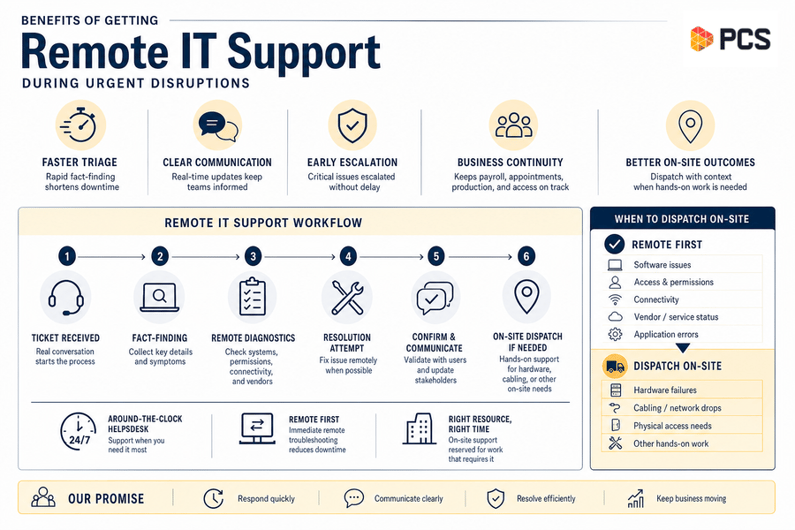
Urgent disruptions need calm triage, not confusion. The benefits of getting remote IT support include faster fact-finding, clearer communication, and early escalation when the issue affects payroll, appointments, production, or office access.
A multi-location office loses access to its line-of-business application two hours before payroll approvals are due. Remote support can check user permissions, endpoint behavior, internet connectivity, and vendor status while managers keep employees informed. If hands-on work is required at one site, dispatch happens with better context.
Our around-the-clock helpdesk model helps urgent tickets start with a real conversation. Remote troubleshooting begins immediately, while on-site support is reserved for hardware failures, cabling, or work that truly requires someone in the room.
Business Benefits Of Remote IT Support For Proactive Operations
We do not limit mature IT support to closing break-fix tickets. We also watch for patterns, missed updates, repeated device errors, and security signals that affect reliability, compliance exposure, and daily work.
-
Proactive system monitoring: Alerts help identify server, workstation, or network conditions before staff file duplicate tickets.
-
Maintenance and patch visibility: Leaders can see whether systems are current, delayed, or creating risk for key workflows.
-
Cybersecurity monitoring: Since remote access tooling appeared in nearly 40% of engagements, governed access and monitoring matter.
-
Recurring issue analysis: Repeated login failures or application crashes become planning data, not isolated annoyances.
Planning data also matters. A Forrester Azure composite study found faster server deployment could save 40 hours of IT time per server and $641,000 over three years, while 40% of organizations in an Omdia analysis were turning to fully managed security services for operational technology and 60% of respondents in a Huntress study cited cybersecurity as the top challenge leading them to work with an MSP.
Moving from reactive support to proactive operations takes clear escalation paths, consistent communication, and disciplined follow-through. Protection should never pause, but that principle only works when monitoring, maintenance, and documentation are built into the service model.
Get Faster Remote IT Help
Reduce everyday IT delays with remote support from HelpMePCS that keeps work moving and accountability clear.
Practical Remote IT Support Benefits To Evaluate Before Choosing A Partner
Changing support models affects people, approvals, and expectations. Before you move, confirm how the service will reduce stalled work rather than simply create a new place to send tickets.
-
Confirm response expectations: Clear SLAs and after-hours coverage help managers plan around payroll, invoicing, or shift changes.
-
Review escalation paths: Ask how tickets move from basic helpdesk support to advanced teams.
-
Clarify vendor coordination: Software vendors and internet providers should not leave internal staff managing technical back-and-forth alone.
-
Ask about prevention: Dedicated CSUs, documentation, and HelpMePCS University keep recurring issues visible.
-
Confirm on-site criteria: Remote work should start quickly, with clear triggers for hardware failure, cabling, or network closet issues.
Making The Benefits Of Remote IT Support Work For Your Team
Remote support delivers the most value when faster help, clear accountability, proactive monitoring, and fewer interruptions are built into the service model. That is how daily tickets become better planning information for staffing, systems, budgets, and risk decisions.
At HelpMePCS, we provide human-first, plain-English support backed by dedicated teams who understand each client environment, with our LiveLine Promise answered within 30 seconds by a real HelpMePCS professional, 24/7/365.
If password resets, invoice delays, access issues, or urgent disruptions are still pulling people away from productive work, contact us to discuss whether your current support model is reducing disruption or adding friction.
IT Support Services Near You